
The Illusion of the “Install” Button
In our daily digital lives, we’ve come to expect a certain simplicity. We find an app, click “Install,” and a few moments later, it’s ready to use. This seamless experience, however, creates an illusion of simplicity that doesn’t apply to the large-scale, open-source systems that power our academic and cultural institutions. When it comes to enterprise software like DSpace—a digital repository platform used by libraries and universities worldwide—the reality is far more complex.
This article is a journey behind the curtain. It shares the most surprising and impactful lessons learned from a deep dive into the technical documentation and real-world troubleshooting of setting up a DSpace repository. It’s an exploration of the hidden layers of effort, planning, and precision required to build the digital archives we often take for granted. We’ll uncover the intricate ecosystems, the fragile data pathways, and the high-stakes manual tasks that underpin these vital knowledge hubs.
This is not a technical “how-to” guide. Instead, it’s a reflection on the broader truths these systems reveal about the nature of modern software, the importance of data integrity, and the immense human effort that makes digital preservation possible.
1. It’s Not One Program, It’s an Entire Ecosystem
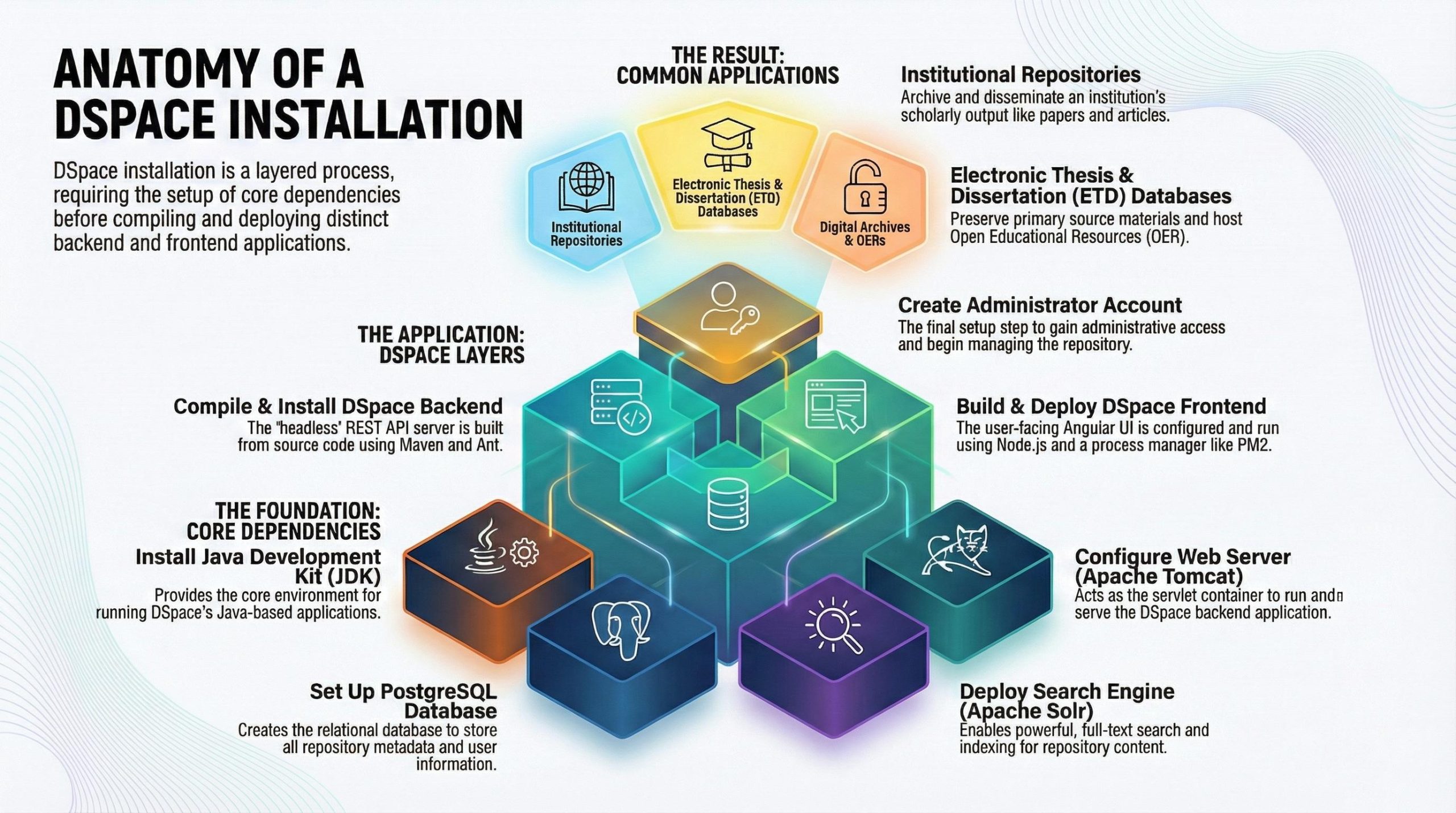
The first and most fundamental surprise is that DSpace isn’t a single, self-contained application you simply install. Instead, it is a suite of distinct, third-party software packages that must be individually installed, configured, and orchestrated to work in harmony. To get the repository running, you must first build its foundation from several powerful, open-source components.
The core components of this ecosystem include:
- Java Development Kit (JDK): The programming language environment DSpace is built on.
- PostgreSQL: The relational database used to store all metadata and user information.
- Apache Tomcat: The web server that runs the Java-based backend application.
- Apache Solr: The powerful search engine that indexes the repository’s content.
- Apache Maven & Ant: The build tools used to compile the source code and run the installation process.
This reality is a stark contrast to the “out-of-the-box” solutions many of us are used to. As one technical document aptly puts it:
A digital library software is not an out-of-the-box solution, but it comprises many software packages that are configured to work in synchronization
This modular approach provides incredible power and flexibility for customization, allowing institutions to tailor the system to their specific needs. However, it also introduces significant complexity during setup, demanding a broad range of technical knowledge across databases, web servers, search technology, and software build processes.
2. The Frontend and Backend Live in Different Houses
Modern DSpace architecture follows a “decoupled” or “headless” model. This means the backend—the core application logic running on Java and Tomcat that manages data—and the frontend—the user interface you see in your browser, built with Angular and Node.js—are two entirely separate applications. They don’t live in the same codebase; they live in different houses and communicate over the digital equivalent of a telephone line.
This communication happens through a REST API. For the system to function, the frontend must be explicitly told where to find the backend. This requires “syncing” configuration settings in two different places: the dspace.server.url in the backend’s local.cfg file must match the rest block settings in the frontend’s config.prod.yml file. If they don’t align, the user interface will have no way to fetch or display repository data.
Managing this setup means possessing expertise in two different software development worlds. The backend requires knowledge of Java, Tomcat, and Maven, while the frontend demands familiarity with a completely different technology stack, including Node.js, Node Version Manager (NVM), Yarn for package management, and PM2 for running the application in a production environment. This separation is a powerful and modern design that improves performance and flexibility, but it’s a significant source of complexity that can surprise anyone accustomed to traditional, monolithic applications.
3. One Wrong Character Can Derail Everything
Complex data systems are incredibly powerful, but they can also be incredibly fragile. A batch import process for adding multiple items to the repository failed repeatedly, and the cause was astonishingly small: a single “strange character” at the very end of one of the PDF filenames.
This wasn’t a simple matter of renaming the file. The fix required a meticulous, two-step correction. First, the character had to be removed from the filename itself. Second, a separate text file within the item’s archive, simply called the “contents file,” also had to be edited. This file holds a manifest of all the digital files (“bitstreams”) belonging to an item, and its entry for the PDF had to be manually corrected to reflect the new, clean filename. Without this second step, the system would still be looking for a file that no longer existed, causing the import to fail.
The impact of this tiny error underscores the unforgiving nature of data processing.
this was some major cause of all important things
This experience is a powerful lesson in the absolute need for precision. In a complex digital repository, where thousands of files and metadata records interact, the smallest mistake—a stray character, a misplaced comma—can have cascading consequences, derailing an entire process and requiring painstaking detective work to resolve.
4. The Terrifying Art of Manual Configuration
Setting up some of DSpace’s core components on Windows is a throwback to a more hands-on, and perilous, era of system administration—a process for which one installation guide rightly warns its readers: “BRACE YOURSELF FOLKS!” Installing build tools like Apache ANT and Apache Maven doesn’t involve an executable installer. Instead, it requires manually extracting files to a directory and then directly editing the system’s environment variables to tell the operating system where to find them.
This process is fraught with risk. Editing the system ‘Path’ variable—a critical list of directories where the computer looks for executable files—is a high-stakes operation. A single mistake can render other essential programs unusable. The installation documentation highlights this danger with a stark warning:
DO NOT remove the existing content form its value field, unless you want to screw up everything and ruin your system.
This manual process, full of potential for “fatal errors,” is a sharp contrast to the automated, safe installers most people are used to. It serves as a surprising reminder that behind the seamless interfaces we use every day, systems administrators perform meticulous, sometimes terrifying, work to make complex software function correctly.
5. When Your Primary Backup Fails, Things Get Creative
No system is infallible, and the true test of a team’s resilience comes when disaster strikes. During a server migration, the team discovered their primary backup method had failed. They had lost their main PostgreSQL database backup file after a server crash, leaving them without a clean, standard way to restore their repository’s metadata and user information.
Faced with a critical failure, they had to get creative. Their last resort was an imperfect but functional workaround.
…our main backup, we lost it somehow. We crashed the server and lost a copy of the PostgreSQL SQL backup file, so this was the only way out for us.
The solution was to use DSpace’s built-in ZIP archive export feature to package the repository’s content and metadata, then use the batch import tool on the new server to restore it. However, the person who implemented the fix was quick to issue a crucial warning about their own solution:
…this is not the crude way of maintaining backups and migrating from one server to another…
This story is a powerful, real-world lesson on the absolute necessity of a robust, tested backup and disaster recovery strategy. It highlights that while ingenuity can save the day in a crisis, these last-resort fixes should never be mistaken for a proper, reliable plan. The best solution is one that you never have to think creatively about.
Conclusion: The Unseen Complexity
The journey of setting up a digital repository like DSpace reveals a world of unseen complexity. Beneath the surface of the polished web interfaces that deliver academic papers and cultural artifacts lies a vast, intricate machinery of interconnected software, meticulous configuration, and dedicated human effort. From the ecosystem architecture and decoupled applications to the painstaking troubleshooting of a single character and the high-stakes reality of manual configuration and disaster recovery, these systems are a testament to methodical engineering and persistent problem-solving.
They remind us that the digital tools we rely on are not magic; they are built, maintained, and repaired by people. They are a product of precision, patience, and the hard-won knowledge that comes from navigating immense complexity.
The next time you effortlessly download a paper from a university repository, what intricate, hidden ecosystem will you remember is working just for you?
Discover more from Rupinder Singh
Subscribe to get the latest posts sent to your email.